
Friction: Uma alternativa Linux gratuita ao After Effects e ao Autograph

A comunidade de produção audiovisual em Linux enfrentou recentemente um golpe significativo com a notícia da aquisição da Left Angle pela Maxon. Este evento culminou no abrupto e inesperado desligamento dos servidores do Autograph em 5 de junho de 2025, tornando o software inoperável da noite para o dia. A interrupção afetou até mesmo usuários que haviam investido em licenças perpétuas, gerando uma onda de frustração e incerteza.
O impacto foi imediato e severo para muitos profissionais. A Movy Audiovisual, uma produtora associada ao Cine Linux, por exemplo, teve cinco projetos de clientes em andamento subitamente paralisados. Essa situação forçou a empresa a uma migração urgente e dispendiosa para outras ferramentas, como DaVinci Resolve e Blender, na tentativa de salvar seu trabalho e cumprir prazos. A resposta inicial da Maxon às preocupações dos usuários foi percebida como um silêncio corporativo disfarçado de marketing, ignorando as perdas financeiras e a interrupção do trabalho, e sugerindo implicitamente a transição para seu ecossistema de produtos. Esta “solução” demonstrou ser inviável para muitos usuários Linux, visto que as principais ferramentas de motion graphics da Maxon, como o Red Giant, não oferecem suporte nativo para o sistema operacional livre.
O Autograph estava crescendo amplamente por seu sistema de composição baseado em camadas, que oferecia uma interface intuitiva e familiar para designers de movimento já acostumados com o fluxo de trabalho de softwares como o Adobe After Effects. No cenário pós-Autograph, a comunidade Linux de motion graphics expressa uma clara preferência por ferramentas que mantenham essa familiaridade. Há uma aversão notável à complexidade visual e à curva de aprendizado frequentemente associadas aos sistemas baseados em nós, como os encontrados no Natron e na página Fusion do DaVinci Resolve [User Query].
O que é o Friction?
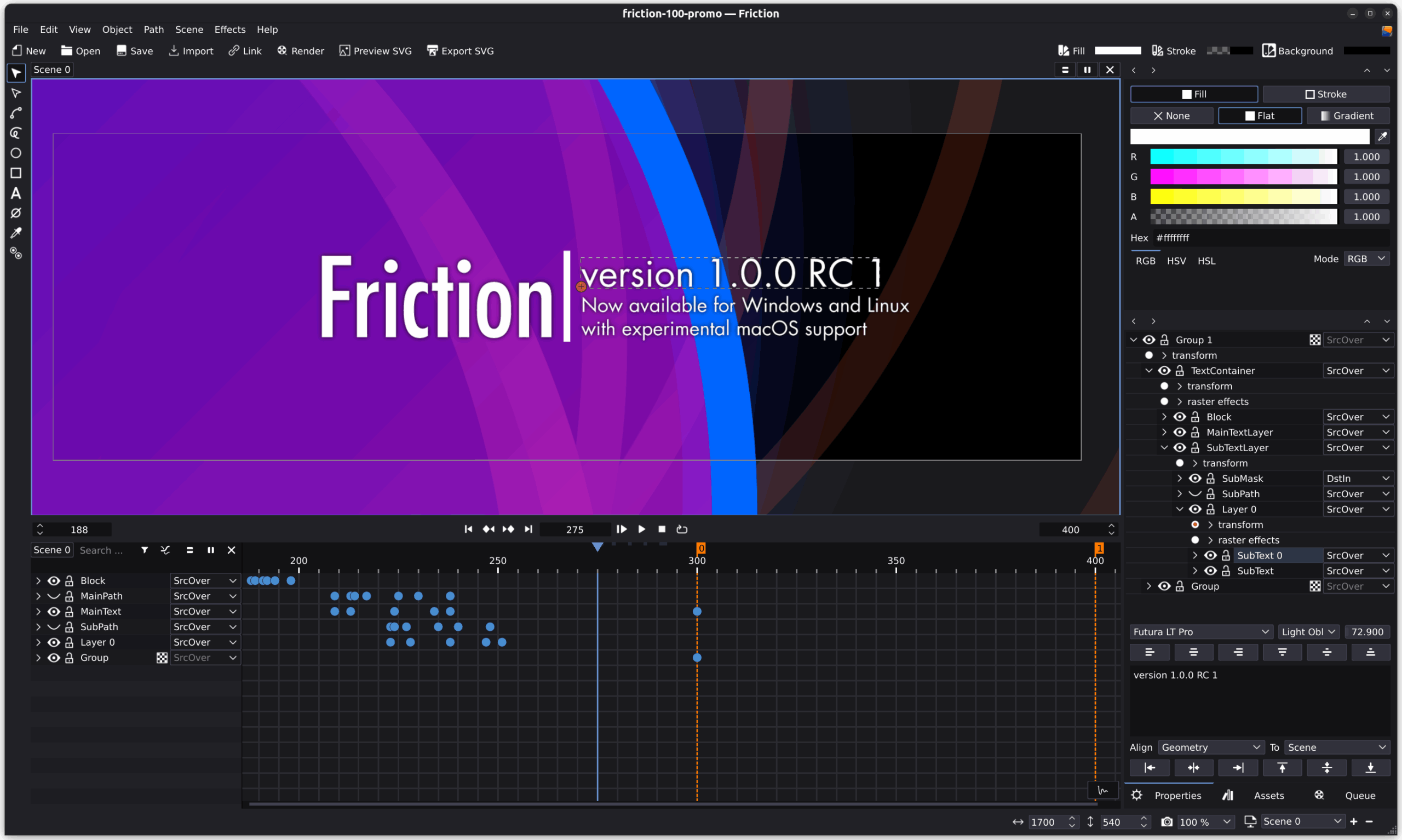
Neste cenário de incerteza e busca por soluções confiáveis, o Friction emerge como uma promissora “nova esperança”. Trata-se de um software de motion graphics e VFX de código aberto que se alinha perfeitamente com a necessidade de um fluxo de trabalho intuitivo baseado em camadas. Além disso, o Friction apresenta um design moderno e é construído sobre uma base robusta, tornando-o uma alternativa sólida (apesar de estar em fase beta) e autônoma para profissionais e entusiastas que operam no ambiente Linux.
Origem e filosofia Open Source
Friction é um software de animação 2D e motion graphics de código aberto, licenciado sob a licença GPL versão 3. Essa licença é fundamental, pois garante aos usuários a liberdade de usar, estudar, modificar e distribuir o software, inclusive para projetos comerciais, sem quaisquer restrições.
O projeto Friction é um fork do software enve, com sua criação datando de fevereiro de 2023. Embora o enve tenha servido como ponto de partida para o desenvolvimento do Friction, o código-base de Friction está em constante evolução e divergirá cada vez mais a cada novo lançamento. Essa separação e o subsequente e rápido desenvolvimento do Friction, com um foco explícito em um “design mais moderno” e em melhorias contínuas de interface do usuário e experiência do usuário (UI/UX), demonstram um compromisso ativo em criar uma ferramenta atualizada e responsiva, distanciando-se de uma simples continuação de seu predecessor. Além disso, a preferência do Friction por padrões web abertos como SVG e SMIL (Synchronized Multimedia Integration Language) em vez de formatos proprietários como Lottie reforça sua filosofia de abertura e interoperabilidade. Essa aderência a padrões abertos é um fator crucial para a confiança da comunidade Linux, que busca evitar as armadilhas de formatos e licenças fechadas, como as que resultaram na descontinuação abrupta do Autograph.
Desempenho e Compatibilidade Multiplataforma
Friction é arquitetado para oferecer alta performance, utilizando um pipeline de vetor e raster otimizado para GPU/CPU, com seu desenvolvimento principal em C++. O software se apoia em tecnologias robustas e amplamente reconhecidas, como Skia, uma biblioteca gráfica 2D de código aberto que aproveita a aceleração da GPU para renderização eficiente, e o framework Qt, uma estrutura de desenvolvimento de aplicativos multiplataforma que facilita a criação de interfaces gráficas.
O software oferece suporte oficial para uma variedade de sistemas operacionais, incluindo Linux (especialmente Enterprise Linux 7/8/9/10 x86_64 e distribuições compatíveis, alinhado com a VFX Reference Platform CY2021+), Windows (10/11 x64) e, de forma experimental, macOS (Monterey 12.7+ Intel). É notável que a versão 1.0.0-beta.2 reintroduziu e aprimorou significativamente o suporte para macOS, incluindo funcionalidades como multi-touch. Os requisitos de sistema são acessíveis, necessitando de uma CPU compatível com AVX e uma GPU compatível com OpenGL 3.3.
O uso de tecnologias de ponta como Skia e Qt, juntamente com o desenvolvimento em C++, sugere uma base técnica sólida para desempenho e escalabilidade, características essenciais para softwares de motion graphics. A ampla compatibilidade com diversas distribuições Linux, incluindo o suporte a Wayland e EGL como padrão, e a capacidade de todos os binários suportarem tanto X11 quanto Wayland de forma nativa , demonstra um compromisso profundo com o ecossistema Linux. Isso vai além de um simples “suporte a Linux”; representa uma integração nativa e bem pensada, que facilita a adoção por uma base de usuários diversificada e garante uma experiência mais estável e alinhada com as expectativas dos usuários do sistema operacional.
Recursos Essenciais e Fluxo de Trabalho Otimizado
A arquitetura central do Friction é baseada em camadas, proporcionando uma organização visual clara e intuitiva. Esta abordagem é imediatamente familiar para artistas que migram de softwares como After Effects, facilitando a transição e a produtividade. O software oferece a flexibilidade de trabalhar em múltiplas cenas simultaneamente, com suporte a múltiplos visualizadores e timelines, permitindo uma gestão eficiente de projetos complexos.
Friction inclui um robusto editor de expressões que suporta ECMAScript. Este editor oferece autocompletar, destaque de sintaxe e a capacidade de criar funções personalizadas, permitindo animações dinâmicas, automação de tarefas complexas e controle preciso de parâmetros.
O Friction oferece uma gama diversificada de efeitos para aprimorar gráficos vetoriais e texto, essenciais para motion graphics:
- Alpha Masking (equivalente a “track matte” do After Effects): Para criar máscaras de transparência, o Friction utiliza um método similar ao “track matte”. O processo envolve configurar duas camadas (a máscara deve estar acima da camada a ser mascarada), agrupá-las, definir o modo de mesclagem da camada de máscara para “DstIn” e, em seguida, promover o grupo para uma camada. Isso garante que o efeito de máscara seja isolado dentro do grupo, permitindo que o grupo seja movido livremente enquanto mantém as animações de entrada/saída.
- Efeito Sub-Path (equivalente a “trim path” do After Effects): Para animar o desenho de traços ou o preenchimento de caminhos, o efeito “sub-path” é a ferramenta ideal. Ele é ativado clicando com o botão direito na camada e navegando para “actions” -> “Path effects” -> “sub-path effect”. Seus parâmetros de “Min” e “Max Length” controlam o segmento visível do caminho (onde 100 unidades representam o comprimento total do traço), e o parâmetro “Offset” ajusta o ponto de origem. É aplicável também a outlines de texto.
- Desenho de Caminhos: O Friction permite desenhar caminhos à mão livre, oferecendo métodos de ajuste automático (controlados por “Max Error” e “Smooth”) ou manual, para maior precisão.
Para garantir a segurança do trabalho, Friction suporta salvamento automático e backup de projetos. Há opções para criar um arquivo de backup na pasta do projeto a cada salvamento e para ativar o auto-save após um tempo especificado, sendo altamente recomendado combinar ambas as opções para evitar a corrupção de arquivos.
O suporte inicial para múltiplas janelas permite que elementos chave da interface, como a timeline e a fila de renderização, funcionem em janelas separadas, otimizando o espaço de tela e o fluxo de trabalho. Uma nova funcionalidade de experiência do usuário, a Command Palette (Ctrl+Space), oferece acesso rápido à maioria das ações do software. Ela suporta listagem de todos os comandos, acesso aos comandos mais recentes e comandos especiais para navegação, transformações e marcadores. O software também inclui suporte básico a marcadores (atalho M) e a definição de pontos de entrada (I) e saída (O) na timeline, facilitando a navegação e a delimitação de seções de trabalho. Uma funcionalidade prática para dividir rapidamente clips na timeline usando o atalho ‘K’ também foi adicionada.
As opções de easing, que antes eram restritas ao editor de expressões e exigiam conhecimento avançado, agora estão disponíveis diretamente na timeline e no gráfico, simplificando a criação de animações suaves e complexas.
Friction suporta uma variedade de perfis de renderização pré-configurados para formatos comuns como MP4 (com e sem áudio, o que não está disponível na versão gratuita do Davinci Resolve), ProRes (com e sem áudio, para fluxos de trabalho profissionais), TIFF e PNG (ambos com suporte a alpha), simplificando o processo de exportação. Também permite a exportação de animações SVG utilizando SMIL, alinhado com padrões web.
Configurações para MSAA (Multi-Sample Anti-Aliasing) foram introduzidas para suavizar linhas e texto, com recomendações específicas para diferentes tipos de GPUs para otimizar o desempenho visual.
Desde as primeiras versões (0.9.1) até as betas 1.0.0 e o Release Candidate 1, o Friction tem recebido constantes aprimoramentos na interface, ícones, widgets da timeline, tratamento de áudio, suporte a HiDPI e muito mais, demonstrando um compromisso contínuo com a experiência do usuário.
A inclusão de recursos como auto-save, modo multi-janela, Command Palette, easing direto na timeline e perfis de renderização pré-configurados indica que Friction está amadurecendo rapidamente de uma ferramenta básica para uma solução mais profissional e focada na produtividade. Estes recursos abordam diretamente as necessidades de um fluxo de trabalho de motion graphics exigente, onde a eficiência, a integridade dos dados e o acesso rápido às ferramentas são críticos.
Camadas vs. Nós
A escolha entre sistemas de composição baseados em camadas e em nós representa uma das divisões mais fundamentais na filosofia de fluxo de trabalho de um artista, com implicações significativas para a intuitividade e eficiência, especialmente no campo de motion graphics.
Sistemas Baseados em Nós (Natron, DaVinci Resolve Fusion)
Nestes sistemas, operações e efeitos são representados como “nós” individuais que são interconectados em um “grafo” ou “árvore de nós”. Cada nó possui entradas e saídas, e o fluxo de imagem é explicitamente visualizado pelas conexões. Por exemplo, em Natron, nós de mesclagem combinam várias entradas em uma única saída, e a ordem de processamento é definida pelos links.
A abordagem baseada em nós é frequentemente elogiada por seu controle granular e fluxo de trabalho não-destrutivo. Isso a torna ideal para projetos complexos de VFX e composição, onde a reutilização de elementos, a manipulação de cores em espaço linear e a capacidade de ajustar qualquer parte do pipeline sem afetar outras são cruciais.
No entanto, para motion graphics, esses sistemas apresentam desafios. Embora a Blackmagic Design promova o Fusion com a ideia de que “Nós são mais fáceis que camadas” , a experiência de muitos usuários para motion graphics revela uma “curva de aprendizado muito íngreme”. A mentalidade de construir fluxogramas pode ser contraintuitiva para quem está acostumado com a pilha de camadas. Grafos de nós podem rapidamente se tornar visualmente confusos e difíceis de gerenciar em projetos complexos de motion graphics, onde a linearidade e a organização visual das camadas são frequentemente preferidas. Problemas práticos como a perda de preview ao desconectar nós, a dificuldade em reorganizar o grafo e a ineficácia da função “Cleanup node graph” são fontes de frustração. Há um consenso entre os usuários de que ferramentas como Fusion são primariamente “programas de composição que podem fazer motion graphics”, enquanto After Effects (e, por extensão, Friction) são “programas de motion graphics que podem fazer composição”. Isso significa que, embora capazes, os sistemas de nós podem não ser otimizados para a agilidade e o tipo de organização visual que os motion designers buscam. Natron, em particular, é frequentemente criticado por sua equipe de desenvolvimento pequena e inconsistente, o que se traduz em instabilidade, travamentos frequentes, problemas de cache e a falta de muitos nós e recursos em comparação com alternativas comerciais. Isso o torna uma opção menos viável para trabalho profissional onde prazos e reputação estão em jogo.
Sistemas Baseados em Camadas (Friction, After Effects)
Nesses sistemas, os elementos visuais são organizados em uma pilha hierárquica, onde a ordem das camadas na timeline determina a sobreposição e a visibilidade. Efeitos e transformações são aplicados diretamente a camadas individuais ou a grupos de camadas.
O modelo de camadas é amplamente familiar para a maioria dos designers gráficos e animadores, especialmente aqueles que migram de softwares como After Effects ou até mesmo editores de imagem como Photoshop. Isso torna a transição para o Friction mais suave e a curva de aprendizado significativamente menos íngreme. A representação linear das camadas na timeline é inerentemente mais direta e fácil de entender para a criação de animações sequenciais, sobreposições de texto e gráficos em movimento. A visualização da pilha de camadas corresponde mais diretamente à percepção humana de profundidade e composição. Para a criação rápida de títulos, transições e gráficos informativos, a abordagem de camadas muitas vezes permite um fluxo de trabalho mais direto e menos “cerebral” do que a construção de grafos complexos, onde cada operação exige um nó e uma conexão explícita.
O Estado Atual e o Futuro do Friction
Um Ciclo de Desenvolvimento Ativo e Transparente
Friction tem demonstrado um ritmo de desenvolvimento impressionante e transparente, com lançamentos regulares que introduzem melhorias contínuas e novos recursos. Este ciclo culminou nas versões beta e release candidate para a tão aguardada versão 1.0.0, sinalizando uma maturidade crescente do projeto. O ciclo de desenvolvimento transparente e a rápida iteração de recursos, especialmente as constantes melhorias de UI/UX e a busca por estabilidade, são um contraponto direto à incerteza e ao abandono vivenciados com o Autograph. Isso constrói uma confiança fundamental na sustentabilidade do Friction como uma ferramenta de longo prazo, crucial para profissionais que dependem do software para sua subsistência.
Destaques do Desenvolvimento Recente (Versões 0.9.x e 1.0.0)
O Friction tem evoluído rapidamente, com um foco claro em estabilidade e usabilidade. Abaixo, um resumo das principais melhorias e recursos introduzidos nas versões recentes:
| Versão | Data de Lançamento (Aproximada) | Principais Novidades/Melhorias |
|---|---|---|
| 0.9.1 | Anterior a Julho 2023 | Melhorias gerais e correções de bugs iniciais. |
| 0.9.2 | Julho 2023 | Nova aba dedicada para entrada e propriedades de texto; aprimoramento dos widgets da timeline com controles de quadros e funções de navegação rápida; atualização de ícones e suporte a tela cheia. |
| 0.9.3 | Agosto 2023 | Padronização da caixa de diálogo de cena (300 frames, 30fps, fundo preto); melhor organização da timeline; exibição do status de renderização do cache; melhorias no widget de fonte e novos ícones. |
| 0.9.4 | Setembro 2023 | Correção do modo tela cheia no Windows; panning no viewer/canvas com ALT; correção de bugs em expressões de easing; melhor tratamento de áudio e suporte aprimorado a efeitos de shader; UX da timeline aprimorada com timecodes e rolagem com modificadores. |
| 0.9.5 | Dezembro 2023 | Correções de problemas de HiDPI; melhorias na fila de renderização (play/clear); aprimoramentos na timeline (atalhos, botões de keyframe); introdução de auto-save e backup de projetos; presets de resolução/FPS na caixa de diálogo de cena; modo multi-janela inicial; melhorias específicas para Linux (binários universais, Skia com libs do sistema). |
| 0.9.6 | Junho 2024 | Primeira versão estável de 2024; melhorias substanciais de UI/UX (viewer, timeline, novo layout handler, atalhos); aprimoramentos de SVG (quick preview, exportação, suporte a line); atualizações do renderizador (perfis de codec); renomear efeitos e estabilidade de shaders; suporte a temas dark/light no Windows; fixes para pacotes Linux; upgrade para Qt 5.15.14. |
| 0.9.6.1 | Agosto 2024 | Última versão de manutenção da série 0.9; correções em animações SVG (skew, stroke, fill-rule, máscara DstIn); melhorias de UI/UX (janelas dockáveis, spinboxes, timecode, atalho ‘Add Key(s)’, scrollbar vertical); fixes de Core (undo, verificação de versão); renderizador com suporte a múltiplas cenas na fila e perfis pré-configurados (MP4, ProRes, TIFF, PNG com alpha). |
| 1.0.0-beta.1 | Outubro 2024 | Todas as funcionalidades planejadas para v1.0 consideradas utilizáveis; barra de ferramentas de cores dedicada; suporte a easing diretamente na timeline e no gráfico; novo tema/estilo de UI/UX; funcionalidade de “Split Clip”; suporte básico a marcadores e pontos In/Out; nova Command Palette (Ctrl+Space). |
| 1.0.0-beta.2 | Dezembro 2024 | Suporte a animateMotion na exportação SVG; melhorias na importação SVG (labels do Inkscape, correção de cor); refatoração de toolbars (móveis); melhorias em marcadores (interativos); correções de Undo/Redo, zoom no gráfico, áudio/vídeo; reintrodução do suporte experimental a macOS com melhorias. |
| 1.0.0-rc.1 | Março 2025 | Lançamento de documentação abrangente; melhorias contínuas de UI/UX (sliders com Shift, toolbars com menu de contexto, restauração de estado da UI, ícones, editor de texto, canvas toolbar); fixes gerais (crash de GPU, portable settings, FPS, shaders); configurações para MSAA; aprimoramentos na ferramenta de alinhamento (incluindo alinhamento de pivô); grandes mudanças no motor de expressões (bindings de cena, funções JS externas, presets); novo método de preview não-cacheado; melhorias significativas no macOS (gestos); aprimoramentos para Linux (Flatpak, XDG Portal, Wayland, EGL como padrão); upgrade do SDK para Qt 5.15.16. |
A Comunidade e Como Contribuir
Friction é um projeto de código aberto que acolhe ativamente contribuições de diversas formas, incluindo código, documentação, relatórios de bugs e sugestões de recursos. Essa abordagem colaborativa é fundamental para o crescimento e a resiliência do software. Os repositórios de desenvolvimento do projeto estão abertos e acessíveis no GitHub, GitLab e Codeberg, oferecendo múltiplas vias para desenvolvedores e entusiastas se engajarem.
Para discussões mais amplas e engajamento social, a comunidade do Friction pode ser encontrada em plataformas como Mastodon, Bluesky e YouTube, onde atualizações e interações são compartilhadas. A presença do Friction em múltiplas plataformas de desenvolvimento e sociais, especialmente as descentralizadas (Mastodon, Codeberg), demonstra uma estratégia de construção de comunidade alinhada com os valores do software livre. Isso não só facilita a contribuição e a transparência do desenvolvimento, mas também cria um ecossistema mais resiliente e menos dependente de plataformas corporativas centralizadas. Este é um fator de segurança e atração para usuários que buscam evitar as armadilhas de dependência de plataformas proprietárias, como visto no caso Autograph.
Olhando para o Futuro (Pós-1.0)
Com a versão 1.0.0 se aproximando rapidamente, o foco principal do desenvolvimento se voltará para a versão 1.1. Esta próxima iteração promete trazer ainda mais melhorias de UI/UX e a introdução de novos e empolgantes recursos. A documentação abrangente, já disponível em https://friction.graphics/documentation, está em constante refinamento, garantindo que os usuários tenham recursos de aprendizado e referência atualizados.
O Friction é uma alternativa sólida e aberta para o profissional Linux?
A descontinuação abrupta do Autograph, embora tenha sido um golpe para a comunidade de motion graphics no Linux, paradoxalmente abriu caminho para que ferramentas de código aberto como o Friction brilhem e provem seu valor. O incidente serviu como um doloroso lembrete da importância da autonomia e do controle sobre as ferramentas de trabalho.
Friction não é apenas uma alternativa para preencher o vazio deixado; é uma solução robusta e em constante evolução para motion graphics e VFX no Linux. Sua adesão a um fluxo de trabalho baseado em camadas o torna uma escolha natural e intuitiva para aqueles que buscam a familiaridade do After Effects e que rejeitam a complexidade dos sistemas baseados em nós como Natron e Fusion.
Entretanto, por se tratar de uma ferramenta que ainda está em fase de lançamento, é preciso ter um pouco de cuidado ao implementar em seu workflow profissional, pois pode ainda apresentar falhas ou limitações. Nesse ponto, o Natron e o Fusion tem superioridade por possuir muitos tutoriais na internet e pela longa estrada que possuem, têm mais robustes quanto a estabilidade.
Entretanto parece uma questão de tempo para a natureza open-source do Friction se tonar uma escolha confiável e promissora para o futuro da produção audiovisual profissional no sistema operacional livre, respaldada por uma licença GPLv3, um desempenho otimizado (graças a Skia e Qt), um conjunto de recursos em rápido crescimento e um forte compromisso com a comunidade Linux.
 Apoie o Cine Linux